







Smart Note-Taking Apps That Do More Than Organize Notes

Ideas disappear quickly. Whether you’re brainstorming a startup, preparing for an important meeting, or managing multiple projects, traditional note-taking apps often become digital filing cabinets rather than productivity tools. Today, however, a new generation of smart note-taking apps is transforming how professionals capture, connect, and use information.

Powered by AI, automation, collaboration, and knowledge management features, these tools don’t just store notes—they summarize meetings, organize research, generate content, connect related ideas, and even help you think more effectively. If you’re still relying on basic text editors, you’re missing out on features that can dramatically improve your workflow.

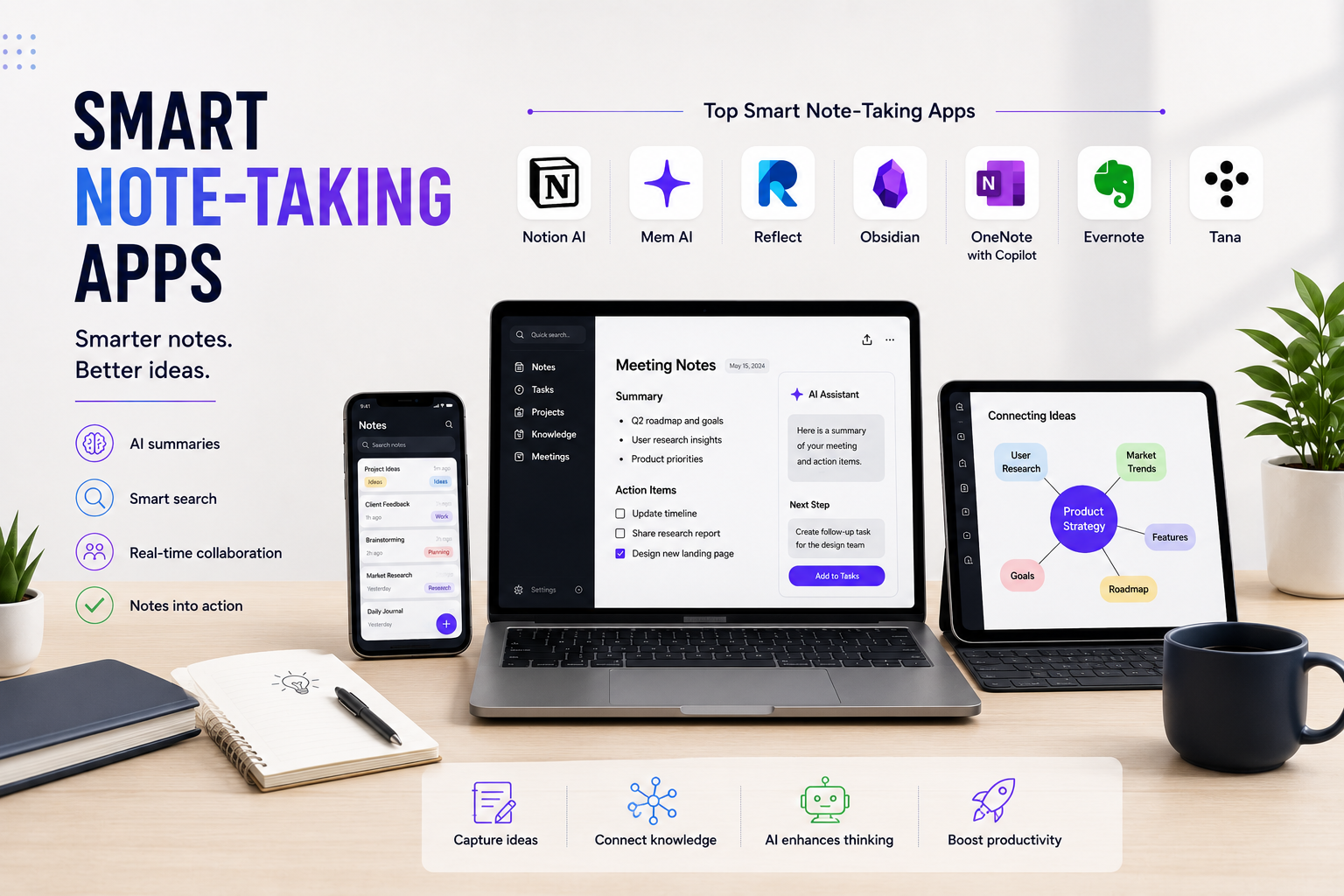
Here are seven smart note-taking apps that go far beyond simple note organization.

1. Notion AI

Notion has evolved from a workspace into an intelligent productivity platform. Its AI capabilities help users summarize documents, generate meeting notes, rewrite content, brainstorm ideas, and organize complex projects.

Instead of manually structuring information, users can ask Notion AI to create action items, draft reports, or explain complicated topics. Combined with databases, templates, and collaborative workspaces, it becomes much more than a notebook.

It’s particularly useful for startups, content creators, product managers, and remote teams.

2. Mem AI

Unlike traditional folders and notebooks, Mem AI automatically organizes your notes using artificial intelligence. It identifies relationships between information without requiring users to categorize everything manually.

The app allows users to quickly retrieve past conversations, meeting notes, research, and ideas through intelligent search rather than remembering exactly where information was saved.

Its AI assistant also helps summarize notes and answer questions based on your personal knowledge base.

3. Reflect Notes

Reflect combines note-taking with powerful backlinking and AI writing assistance. Instead of isolated notes, every idea becomes part of an interconnected knowledge network.

The application integrates seamlessly with calendars, making it useful for meeting preparation, daily journaling, and project planning. AI features can summarize notes, improve writing, and generate new ideas from existing content.

Reflect is especially popular among professionals who practice knowledge management and personal productivity systems.

4. Obsidian

Obsidian takes a different approach by treating notes like a connected knowledge graph. Users create links between ideas, allowing information to grow into a personal knowledge network over time.

Its extensive plugin ecosystem adds features such as AI integration, task management, diagrams, and advanced search capabilities.

Researchers, developers, writers, and students often choose Obsidian because it provides complete ownership of data while remaining highly customizable.

5. Microsoft OneNote with Copilot

Microsoft has enhanced OneNote with Copilot AI capabilities, bringing intelligent assistance directly into the familiar notebook environment.

Users can summarize lengthy meeting notes, generate project outlines, organize brainstorming sessions, and create structured documents from scattered information.

For organizations already using Microsoft 365, this integration creates a seamless productivity ecosystem across Teams, Outlook, and Word.

6. Evernote

Evernote remains one of the most recognizable note-taking platforms, but recent AI improvements have modernized its capabilities.

Users can search handwritten notes, scan physical documents, organize research, summarize content, and retrieve information quickly using intelligent search features.

Its document management capabilities make it particularly valuable for professionals handling contracts, receipts, reports, and client documentation.

7. Tana

Tana introduces a unique “everything is connected” approach to knowledge management. Rather than creating static documents, users build structured information that can automatically transform into tasks, databases, meeting notes, and project dashboards.

AI features help organize information dynamically, reducing the need for manual formatting while keeping large knowledge bases searchable and interconnected.

Although it has a learning curve, Tana offers exceptional flexibility for advanced users managing large amounts of information.

Why Smart Note-Taking Apps Matter

The value of modern note-taking is no longer about writing things down—it’s about making information actionable.

Today’s professionals deal with meeting transcripts, research papers, client conversations, brainstorming sessions, and project documentation every day. Smart note-taking apps reduce the time spent searching for information while increasing the value of every note through AI-powered organization and retrieval.

Instead of becoming forgotten documents, notes become searchable knowledge that supports better decisions, faster collaboration, and improved productivity.

Choosing the Right Smart Note-Taking App

The best solution depends on how you work.

If you need an all-in-one productivity workspace, Notion AI offers excellent flexibility. Users focused on effortless organization may prefer Mem AI, while knowledge management enthusiasts often gravitate toward Obsidian or Reflect. Businesses invested in Microsoft 365 can benefit from OneNote with Copilot, while professionals handling extensive documentation may find Evernote more practical. Power users looking for advanced structured thinking should consider Tana.

The good news is that most of these platforms offer free plans or trial versions, making it easy to experiment before committing.

Final Thoughts

The era of digital notebooks acting as simple storage systems is coming to an end. Modern smart note-taking apps combine artificial intelligence, knowledge management, collaboration, and automation to help users think more clearly and work more efficiently.

As AI continues to evolve, note-taking applications are becoming intelligent workspaces capable of organizing information, generating insights, and supporting better decision-making. Choosing the right platform isn’t just about taking better notes anymore—it’s about building a smarter system for managing everything you know.

Vansh Banthia
We will be happy to hear your thoughts

Leave a reply

ToolsMetric
Logo
Compare items
  • Total (0)
Compare
0